Wednesday, June 24, 2009

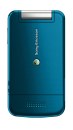
Sony Ericsson T707 Review


Specifications
--------------
3G up to HSDPA (can surf net up to 7.2mbps)

Dimensions 93 x 50 x 14.1mm (thinner than my phone leh)

Weights 95g (same weight as my phone)

Screen Size 240 x 320 pixels, 2.2 inches wit 256k colors
Secondary Screen 36 x 128 pixels, 1.1 inches

Memory 100 MB internal memory
Using Memory Stick Micro (M2), up to 16GB.
Given 1GB memory on purchase

Bluetooth v2.0 with A2DP (A2DP means can listen to music using bluetooth device)
Camera 3.2 MP, 2048 x 1536 pixels. (but no auto focus and LED light)
Video QVGA@15fps (not really good, but better than none)

Battery Stand-by Up to 400 h (2G) / Up to 400 h (3G)
Talk time Up to 10 h (2G) / Up to 4 h (3G)

These are the most important specifications that i've collected. The rest are quite useless from my personal view. They just wanna add those in to make it longer and to confuse consumers. Overall, this phone is abit more changgih den my k770i. Can even use this phone to connect to your lappie to online coz it supports up to HSDPA!


The phone exterior looks super keng but from pictures i dont really like the keypad each key is a little too far apart. Might be abit uncomfortable especially when you are on texting mania. Just my feel, gotta touch the real phones only can verify my statement.
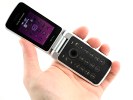
I like the exterior very much. Very stylish and elegant especially the front lid. the semi-circle is superbly nice. No wonder u like this phone so much. No doubt this is a nice phone at a very resonable price. But gotta see wad ppl says abt this phone first coz its very very new in m'sia. I cant believe that finally there is a flip phone that is so thin like my k770i. Felt abit of regret buying my k770i already. It claims dat both screens are scratch resistant but its not totally scratch proof. I read in forums, ppl saying that its quite easy to get scratches especially on the outter sceen.
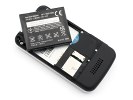
The battery is super keng compared to my k770i which can only last for 3 hrs of continous talking. This T707 still have half of its battery after 4hrs talking on the phone =)

Speakerphone testVoice, dBPink noise/ Music, dBRingingphone, dBOveral score
Nokia 6600 fold66.762.164.6Below average
Sony Ericsson W99565.566.573.5Average
Sony Ericsson W30271.668.676.7Good
Samsung G400 Soul69.773.584.7Very Good
Sony Ericsson T70774.881.675.7Excellent

And one of the most important thing of a phone is the speaker and microphone. The microphone is by far the best comparing with the phones above. The speaker is also not too bad. Enough to wake you up when i call =)


Testimonials
-------------
"I've had this phone for about a week now. I'm very impressed with the design. It's very sleek and "cute" I got mine in pink.
I'm happy with the camera, the pictures are very clear. I like the menu style, there are a few to choose from for you own preference.
'm a huge texter, the although the keypad does not look plastic, it's kind of flat and spread out. Spread out is usually good, but it's really hard when it's flat also because my thumb/hand gets so tired after texting."
anonymous 1

"However, I'm pretty upset with the camera, doesn't look like a 3.15MP cam with image quality almost the same with my old w700i. The only good thing is, this phone processes image faster, that's all.

I'm giving this phone a 8 out of 10. "
anonymous 2

"when someone calls you, and you want to mute the call, or if you want to snooze your alarm, just wave your hand over the camera and that's the gesture control... it's kind of difficult to use though you have to move your hand the right way."
anonymous 3

"The exterior is really beautiful...
But, I don't really like the keypads...
It would be better if the screen are larger, may be as big as G705 or W715
If only there is a G705 repackaged as a beautiful clamshell... *sigh
G705 itself is a beauty though..."
anonymous 4

"Well what can we say about the Sony Ericsson T707 mobile phone other than fantastic. It caters for all ages but will be very eye-catching to the younger generation. It is stylish and has all the mod cons we expect to be available on mobile phones today but that are not too fussy or complicated. We at mobilefonereviews.co.uk think this handset wii be a hit and definitely popular amongst those who enjoy listening to music and keeping in contact with friends and family, a great mid range handset. We like this mobile phone Sony and think the T707 will do extremely well indeed!"
miscellaneous forum 1

"Google Maps for Mobile come preinstalled on the Sony Ericsson T707!!"
daniel ngan


Overall the T707 sounds not too bad. I myself had already been indulged by its sexy silky exterior. The price is around rm700 for an AP set. So far there isnt any bad comments about the design fault or which ever yet. Unlike my phone, the keypad become less sensitive is due to the design fault. No matter how many times sending it for repairing and warranty the problem will comes back in a while....

Tuesday, March 24, 2009

back cover revised


back cover revised as u criticise
wad do u think now?
ok?

Monday, March 23, 2009

Datuk's Front View CD Cover
I haven complete the back cover yet..

This is DR.CKY front view of her CD Cover..
wad do u think?
will she like it?


This is the back view of her CD cover.
i haven insert her picture at the biography yet.

Sunday, March 22, 2009

UTAR Buddhist Society Movie Sharing : Oseam


wad do u think?
nice boh?
come n shoot me...

Friday, January 16, 2009

Comparison

DELL XPS is DELL's hi-end laptops build mainly for gaming purposes.
where DELL Inspiron series are for normal home users to use.

Comparing the weight,
DELL XPS M1330 is less than 2.okg
DELL Inspiron 1318 is around 2.1kg
DELL Inspiron 1420 is around 2.4kg

Cons,
The XPS M1330
-is build using alluminium aloy which means when u use quite long than the palm rest (the place u put ur palm) will be abit hot. Not hot as in boiling water..
-This model only have 2 USB ports, which to me is not enuff.
-The processor not too good compare to other 2.
-The Harddisk is only 160 GB
-No other colour except black,blue n red
-Intergrated Graphics(x3100) and not external

The Inspiron 1318
-This model also have only 2 USB ports.
-The palm rest area is glossy, easy to spot oily patches
- I dont like the black interior.. hehe..
-The Harddisk is only 160 GB.
-Only blue colour is available
-Intergrated Graphics(x3100) and not external

The Inspiron 1420
-Abit heavy n bulky that the other 3
-The palm rest can become black when its about a yr old coz our hand sweat erode it.
-The durability is lousy, the paint easily come off when scratched

Pros,
The XPS M1330
-The system is DELL high end laptop
-Made from alluminium alloy, can tahan mati
-Very thin n slim n light
-Got HDMI, for hi-end video recording if u have a hi-end video camera
-The volume button is touch sensitive
-Got finger print scanner, for u to scan ur finger to unlock ur laptop(no need type password dy)

The Inspiron 1318
-This model has not launch in malaysia yet, u will be one of the 1st to buy it
-Small and light
-The battery life span can last up tp 3 hrs (XPS m1330-1hr 45min , Inspiron 1420-2hrs)
-The button for volume is touch sensitive

The Inspiron 1420
-The most common Dell laptop pl would buy.
-Got green colour
-250 GB harddisk
-Got external graphic card (not intergrated x3100) (can play better games)
-Bigger LCD screen


Stock Availability
For both Inspiron 1318 and XPS M1330 need to wait till tuesday onli can get.
which means i can go get the lappie for u den onli past it to u.

For Inspiron 1420 Green colour,
its available at Lowyat Plaza ready stock.
Tomorrow can get.

The Dell Inspiron 1420

The 1420 caries forward what can only be described as "traditional dell design" with simplified lines. In short, the new Inspiron notebooks look very similar to the previous generation of Dell notebooks ... but Dell engineers have stripped the white bumpers and added a nice coat of paint. While the design isn't as innovative as what we saw in the new Dell XPS M1330, the simple lines and solid construction look quite nice for a budget notebook. Students certainly shouldn't be ashamed of how the 1420 looks when they carry this notebook to class. From the matte black and silver-metalic plastics to the painted lid the Inspiron 1420 is a design that lacks the flash but isn't short on style.

The Inspiron 1420 lid does not have a latch to hold it closed, but the hinge mechanism works well and firmly holds the lid in place. There is almost no flex to the screen. The lid of the 1420, like all the new Inspiron notebooks comes in your choice of eight colors for an extra level of customization. Our review unit came with an "Espresso Brown" paint job. The paint looks quite nice and durable at first glance.


After opening the lid and seeing the silver plastic interior and rounded surface of the 1420 you'll notice how solid the notebook feels ... at the expense of some added thickness. The entire case is sturdy with relatively thick plastic and magnesium alloy reinforcement in just the right places. There are no creaks or signs of case flex anywhere to be found.

The Dell Inspiron 1420 is a solid notebook with an impressive set of features at a value price. As students are getting ready to return to class this notebook will certainly be a strong candidate for a school notebook. The choice of eight available colors is a nice addition, though we aren't quite sure how Dell's paint job will hold up to abuse. While the entry-level version of the 1420 with integrated Intel graphics lacks the power for serious gaming, the dedicated nVidia graphics card makes for a capable value gaming machine and mobile multimedia center. Of course, once you add all of the available options to make the 1420 a real powerhouse the cost begins to eat away at the "value" benefit of this notebook.

The Specs:
Inspiron 1420
Intel® Core™ 2 Duo T5800 (2.0GHz,800Mhz FSB,2MB cache)
14"1 inch LCD
2 GB RAM
250 GB HardDisk
Nvidia GeForce 8400GM 128mb Graphics
Windows Vista Home Basic
DVDRW
2.0 Mega Pixel Webcam
Wireless/Bluetooth
GREEN colour

RM2599

For more info, surf:

http://www.dell.com/content/products/productdetails.aspx/inspnnb_1420?c=us&cs=19&l=en&ref=lthp&s=dhs

The Dell Inspiron 1318

The design of the Inspiron 13 is remarkably similar to the XPS M1330 and really sets it apart from the older Inspiron notebooks. The design is, in a word, attractive. The sloping look and glossy blue lid are immediately attention grabbing. The slope is akin to a fast car tear drop look. The screen hinges use the same rounded design found on the XPS M1330, but this time they're black plastic with metal core instead of a brushed metal exterior. The wedge-like angles to the chassis design likewise make the Inspiron 13 look like it has the same DNA as the XPS line.

Once opened the Inspiron 13 provides a conservative, black plastic design. The buttons along the top edge are touch sensitive but don't light up with a soft glow when pressed like the media buttons on the XPS line. The black colored keyboard and textured black plastic palm rests are nice, but the palm rests are made of a textured black plastic that looks quite cheap and has the horrible side effect of picking up skin oils and sweat ... making your attractive notebook look tarnished and dirty.


The chassis is quite rigid with metal support in just the right places and little or no flex on the palm rests or anywhere on the base of the notebook. The back of the LCD does have some flex and it's possible to produce ripples on the screen if you press firmly on the back of the panel. The hinges are extemely firm and smooth and help give the Inspiron 13 a quality look and feel.
Overall we have to say that the Inspiron 13, like the XPS M1330, is a visually appealing notebook with solid build quality.


The speakers for the Inspiron 13 are located at the top of the keyboard area. There's not much to write home about the speakers, they get loud enough that's for sure, but the sound is slightly tinny as is the case with nearly all laptop speakers. The volume audio controls are touch sensitive buttons along the top right side of the keyboard. It's a little hard to use these buttons if you have big fingers, and most of the time the buttons won't register a press if you press them multiple times too quickly. Overall the volume control buttons are tough to use, though they look nice, an old fashioned volume dial control is easier to use.

The keyboard look and feel is very businesslike, sporting black matte keys instead of glossy painted keys found on many new notebooks. The typing feel is excellent, with a soft, barely audible click on each keypress and very little keyboard flex. The area above the optical drive has slightly more flex than the rest of the keyboard, but it is still very minor compared to other notebooks ... and the keyboard on this notebook is actually much more rigid that the keyboards on the new ThinkPad T400 and T500 series notebooks.

The specs:
Inspiron 1318
Intel® Core™2 Duo Processor T5750 (2M Cache, 2.00 GHz, 667 MHz FSB)
Windows Vista Home Basic
160 GB Harddisk
2 GB RAM
Integrated x3100 Graphics
DVDRW
2 Mega Pixel webcam
13"3 inch WXGA screen
BLUE colour only

RM2300

*this model only available in US, not yet announce in malaysia yet*
*got it from my supplier*

for more info, u can surf:
http://www.dell.com/content/topics/topic.aspx/global/products/inspnnb/includes/en/us/laptop-inspiron-13-superview?c=us&cs=19&l=en&s=dhs